
How to Create a Matching Avatar and Banner
Customize one character and preview an avatar asset pack with coordinated profile pictures, expressions, a transparent character and a social banner.
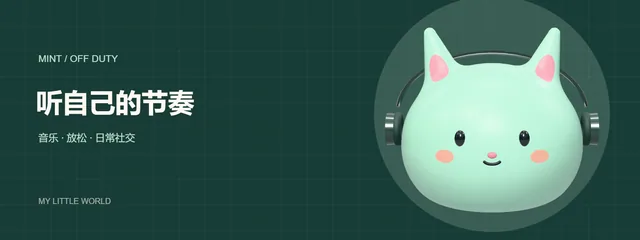
A matching avatar and banner give one profile a consistent character and palette. The avatar asset pack turns your customized character into nine PNG images, so you can choose a profile picture and a banner from the same set.
Choose a theme and customize the character
Open the avatar studio and find the asset pack builder below the editor. Choose a theme and apply it to load its character preset. The current themes include a mint cat with headphones, a midnight alien and a peach artist bunny.
Change colors, the face and accessories in the editor. Add a nickname in the pack builder if you want it in the pack design. Keep it short and check the preview to make sure it remains readable.
Preview the nine images
Generate a preview before downloading. The set includes:
- Three profile images: main, dark and themed versions.
- Four static expression PNGs: hello, happy, wink and sleep.
- One transparent character PNG for your own designs.
- One coordinated social banner.
The profile images, expressions and transparent character are 1024 × 1024. The banner is 1600 × 600. They are PNG images rather than animated GIFs.
Inspect the character, text and framing in the preview. If you edit the character, theme or nickname afterward, generate a new preview so the downloaded pack reflects your latest choices.
Download and use the pack
Sign in to download the ZIP. A pack costs 18 credits; generating its preview does not spend credits. The archive includes the nine PNG images and a presets.json file containing the character settings.
Choose the profile image that looks clearest on your background. Upload the banner separately and crop it for the platform you use. Banner display sizes vary, so check its preview before saving; the generated image is not automatically fitted to every platform.
For Discord profile pictures, use a square PNG and check the circular crop. If you need your own background, use the transparent character and follow the transparent avatar PNG guide.
An asset pack gives one character several coordinated images. To make a pair for two people, follow the matching animal PFP guide and export the two characters separately. See plans and credits for more downloads.